
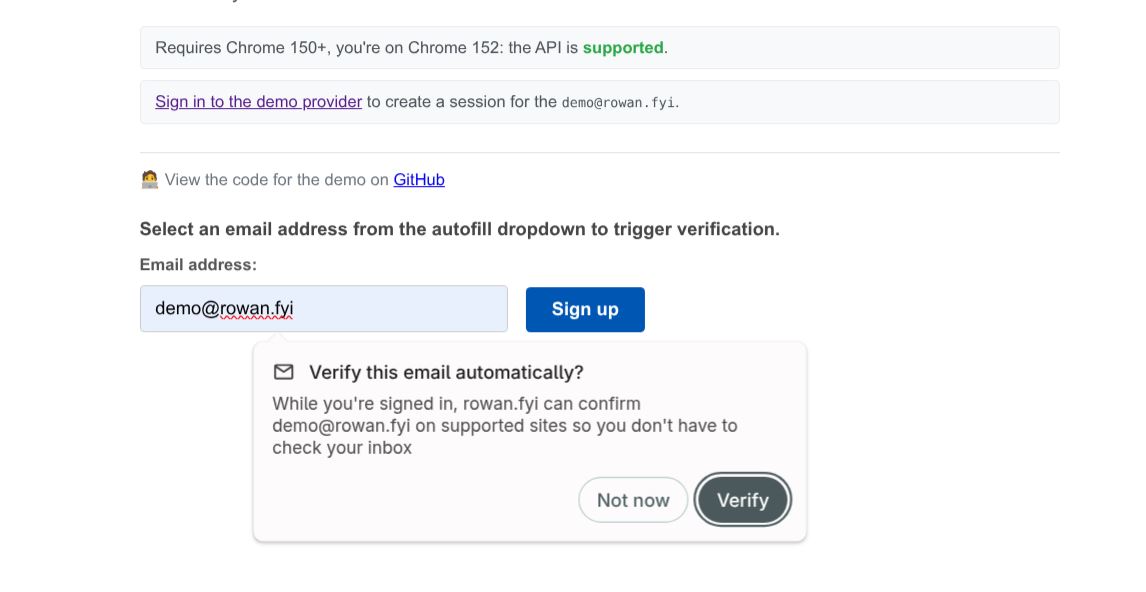
Google is testing a new way to verify email addresses without sending a confirmation email or one-time passcode (OTP). The new Email Verification API, now available as a Chrome Origin Trial, lets your browser confirm that you own an email address without leaving the signup page.
Currently, if you collect an email address for a newsletter, account registration, checkout, or password recovery, you have to send a verification email. Your subscriber must leave your website, open their inbox, then click a verification link or copy a code to complete the signup. (Read about a company that was fined $300,000+ for sending marketing emails to unconfirmed subscribers).
Google’s new approach removes that trip to the inbox.
Instead of sending an email, Chrome checks whether you are already signed in to your email provider, such as Gmail. If you are, the browser asks the email provider to confirm ownership of the email address and returns that confirmation to the website within seconds. The entire process happens in the background, so your subscriber will not have to leave your signup page.
If you want to test the feature on your signup forms, you will need to join Google’s Email Verification Origin Trial and update your forms to support the new API. To get started;
- Register for the Email Verification Origin Trial.
- Get the token and add it to your header section
- Also, in your registration or subscription form, add a hidden verification field.
- Generate a unique security token (called a nonce) for every signup request.
- Update your server to validate the verification token that Chrome returns.
- Keep your existing email verification flow as a fallback when automatic verification isn’t available.
You don’t have to replace your current verification process. If the browser or email provider doesn’t support the feature, your existing double opt-in or email verification flow continues to work.
NOTE: If you select the third-party option during registration, then note that a third-party token must be provided in an external JavaScript file included with a <.. script..> element; a third-party token won’t work in a meta tag, inline script, or HTTP header.
So if you are getting a missing token error, either regenerate a first-party origin trial token for your domain, or if it must stay third-party, load it via an external script tag instead of the meta tag, e.g.:
<..script src=”/js/ot-provision.js”..>
Also note that the user must select their email address from the autofill or autocomplete drop-down; support for manually typed addresses is planned for a future release. So even once the token loads correctly, a manually typed email will never trigger EVP; that’s expected, not a bug
You can read more in the Chrome Developers blog or follow the proposal and provide feedback on GitHub.